
How MINI Operating System 9 makes the 2026 MINI Cooper 4 Door feel right at home around Culver City, CA
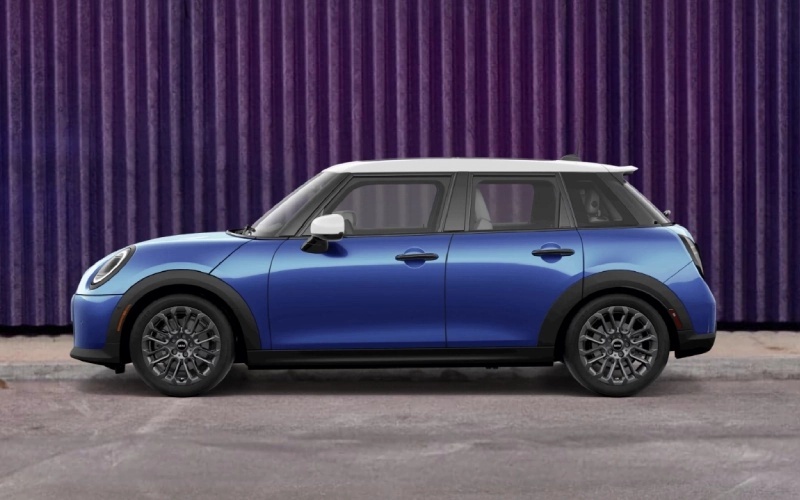
MINI of Universal City – How MINI Operating System 9 makes the 2026 MINI Cooper 4 Door feel right at home around Culver City, CA
The 2026 MINI Cooper 4 Door brings a personality-packed interior that’s as functional as it is fun, and at the center of it all is the circular MINI OLED Display running MINI Operating System 9. If you spend time navigating Culver City’s bustling boulevards, studio zones, and busy parking structures, the way this system blends clarity, speed, and voice control can be the difference between a good drive and a great one.
Let’s unpack how the software, interface, and assistive features work together to make dense-city motoring feel natural—from smartphone integration to driver aids and even in-cabin ambiance that keeps you focused and refreshed.
What MINI Operating System 9 does better
MINI Operating System 9 is purpose-built for quick, glanceable interactions. The 9.4-inch circular MINI OLED Display keeps navigation, media, and vehicle controls organized in a layout that is easy to parse at a stoplight or while parked. Cloud-based navigation provides smart routing across the Culver City grid, and the graphics feel clean and modern, which lowers the learning curve if you’re new to MINI.
Voice control is equally impressive. Say “Hey MINI” to set a destination, adjust temperature, or switch drive vibe—no digging through submenus. It’s a hands-and-eyes-friendly approach that supports confident driving in crowded corridors like Washington Boulevard or Jefferson Boulevard.
Wireless connection that just works
Standard wireless Apple CarPlay® and Android Auto™ keep your digital life flowing naturally. Maps, playlists, and podcasts appear in crisp detail on the circular display, and the system’s responsiveness makes it feel native rather than a workaround. Because it’s wireless, you can drop your phone in the console and go—no cable shuffle as you dart into a tight spot or pull up to pick someone up on Culver Boulevard.
The MINI App adds a helpful layer too. You can precondition the cabin, check vehicle status, or even use available Digital Key Plus to lock and unlock the car with a compatible smartphone. In day-to-day Culver City living, this removes friction from quick neighborhood hops or studio visits.
Parking tech for dense, real-world spaces
Available Parking Assistant Plus and Back-Up Assistant are difference-makers when you’re angling into compact, multi-story parking or parallel spaces with impatient traffic behind you. Parking Assistant Plus can help identify spots and assist with steering into them, while Back-Up Assistant retraces a recent path in reverse—ideal if you’ve navigated a narrow driveway to a courtyard or alley loading zone.
Combine that with the 4 Door’s friendly footprint—easy to swing into short curbs—and the whole experience supports urban life without sacrificing MINI’s signature agility.
Driver assists tuned for city pace
Available Active Cruise Control helps smooth stop-and-go stretches on the 10 or 405, maintaining a set gap to the vehicle ahead. Available Lane Departure Warning and available Active Blind Spot Detection add confidence when traffic gets choppy, providing alerts as needed to help you stay centered and aware.
Up top, MINI Head-Up Display projects key information into your line of sight. It’s the kind of helpful detail that reduces distraction when you’re watching for cyclists or pedestrians near the Arts District or Helms Bakery area.
Experience Modes: more than a party trick
MINI Experience Modes—Personal, Core, Timeless, Go-Kart, Vivid, Green, and Balance—change lighting, projections, and sometimes even sound, giving the cabin a distinct personality while you motor. It’s not just about theatrics. The right mode can help set your focus, soften a long commute, or add energy to an evening drive across town.
Once you find your favorite modes, you’ll appreciate how quickly you can access them via voice or the MINI Toggle Bar, which centralizes commonly used controls within easy reach.
What about updates and longevity?
MINI Operating System 9 supports Remote Software Upgrade, so your 2026 MINI Cooper 4 Door can receive new functions and refinements over time. That’s good news if you plan to keep the car for years; your interface doesn’t feel frozen in time. It evolves, much like your routes and routines around Culver City.
If you’re considering the 4 Door as your primary city car, this software-forward philosophy means you aren’t just buying a static feature set. You’re adopting an evolving platform engineered to stay current with the ways we commute, connect, and unwind.
FAQ: quick answers for Culver City drivers
Does the circular MINI OLED Display make everyday tasks simpler?
Yes—its clear layout, quick response, and voice control reduce the taps you need for navigation, media, and climate adjustments around town.
Is wireless Apple CarPlay® and Android Auto™ standard?
Both are standard, letting you keep a clean cabin without cords while still using your preferred apps for maps and media.
Can the car help with tight parking scenarios?
Available Parking Assistant Plus and Back-Up Assistant are designed for exactly that—threading into compact spaces and helping retrace a narrow approach in reverse.
Will the tech feel current in a few years?
With Remote Software Upgrade and thoughtful hardware like the MINI OLED Display, the 4 Door is primed to stay fresh well into your ownership experience.
When you’re ready to take a closer look, MINI of Universal City can walk you through the tech in person, set up a focused test drive, and help tailor a configuration for your commute. Our team is serving Santa Monica, Brentwood, and Culver City with product know-how and easy online tools so you can chart the perfect path to your next MINI—whether you prioritize parking prowess, connected convenience, or all of the above.
0 comment(s) so far on How MINI Operating System 9 makes the 2026 MINI Cooper 4 Door feel right at home around Culver City, CA