
Does the 2026 MINI Cooper 2 Door include wireless Apple CarPlay® and Android Auto™ for Santa Monica, CA drivers?
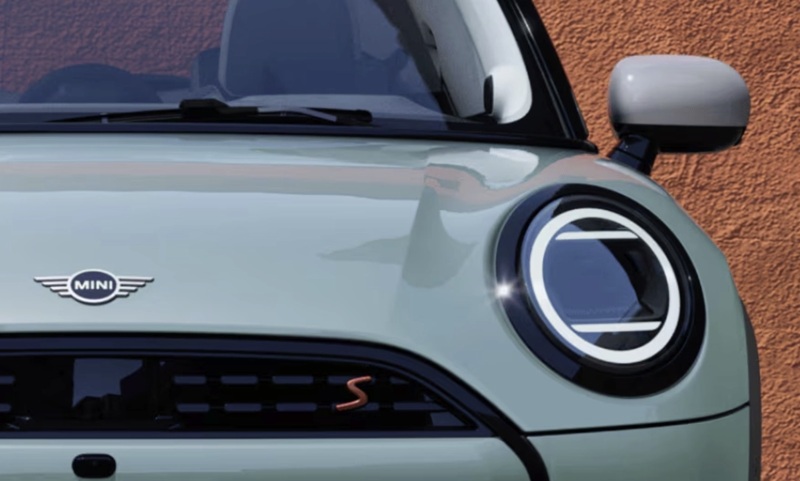
MINI of Universal City – Does the 2026 MINI Cooper 2 Door include wireless Apple CarPlay® and Android Auto™ for Santa Monica, CA drivers?
For drivers who want a compact car that’s easy to live with and even easier to connect, the 2026 MINI Cooper 2 Door delivers a best-of-both-worlds solution—iconic style outside and thoroughly modern tech inside. One of the most important questions shoppers ask today is whether the MINI supports their digital life without fuss. The short answer is that wireless Apple CarPlay® and Android Auto™ are built in, and they’re thoughtfully integrated into MINI’s new circular 9.4-inch MINI OLED Display for a clean, cable-free cockpit that suits Santa Monica, CA driving.
That’s only the starting point. Because the MINI Operating System 9 interface is designed for touch and voice, you don’t need to dig through menus to get where you’re going or to start your playlist on a quick run up Ocean Avenue. With wireless compatibility, the experience is seamless—as soon as you start the vehicle, your phone and your MINI pick up where you left off, maps and media ready to go.
Wireless connectivity that feels natural
Wireless Apple CarPlay® and Android Auto™ make day-to-day driving easier in multiple ways. First, you can leave the cords at home or out of sight, keeping the cabin clean and tidy. Second, the circular MINI OLED Display presents your app tiles and navigation beautifully with high contrast and crisp graphics, so guidance and controls are easy to read at a glance. Third, voice integration works hand-in-hand with MINI Intelligent Personal Assistant. If you’re navigating toward the beach or heading inland for a meeting, ask for a route, change music, or adjust the temperature without taking your hands off the wheel.
For Santa Monica, CA traffic, that blend of clarity and control is particularly helpful. The interface responds quickly to swipes and taps, and you can swap between MINI functions and your connected apps effortlessly. Whether you prefer Apple Maps, Google Maps, or Waze, guidance flows naturally across the display, and the standard MINI Head-Up Display can present key info so you can keep your eyes forward.
Beyond mirroring: the MINI OS 9 advantage
Because the 2026 MINI Cooper 2 Door runs MINI Operating System 9, the car’s native features elevate your phone’s capabilities. Intelligent Cloud-Based Navigation offers real-time traffic insight and clear routing, augmented by proactive suggestions. Remote Software Upgrades help keep features current, while MINI Connected services bridge the smartphone and car for added convenience. Taken together, this suite means you get the best of both worlds—your favorite apps exactly as you like them, plus a robust native platform that learns and supports your routines.
The intuitive layout also means less time poking around and more time gliding through traffic. The MINI Toggle Bar provides physical controls for common actions—like MINI Experience Modes or the parking brake—so basic tasks remain satisfyingly tactile, while the OLED display handles deeper customization and connected functions.
Parking and safety support for coastal living
In a place where street parking can be at a premium, standard Parking Assistant is a genuine value-add. It scans for suitable spots and can steer you in with poise, reducing the stress of snagging a space near your favorite spot on Main Street. If you want more visual assistance and automation, available Parking Assistant Plus is worth a look. Meanwhile, available safety systems such as Active Blind Spot Detection, Lane Departure Warning, and Frontal Collision Warning with Brake Intervention provide elevated confidence in busy corridors.
It all comes together as an ownership experience that’s more than just mirroring your smartphone. With MINI’s latest tech, you get an ecosystem where wireless CarPlay® and Android Auto™ feel native—and stay that way, thanks to over-the-air upgrades.
How to make the most of your MINI’s tech on day one
When you take delivery, a few simple steps will help you get up to speed quickly without slowing your day. These ensure your wireless setup is secure and hassle-free, whether you’re heading to the pier or cruising toward Brentwood.
- Pair your phone wirelessly: Use the on-screen prompts to add your device once, then set it to connect automatically.
- Customize app tiles: Arrange the most-used navigation and media apps near the top for faster access on the circular screen.
- Set navigation preferences: Choose your preferred map app and route settings—fastest, eco, or scenic—before your first commute.
- Enable voice commands: Confirm permissions so MINI Intelligent Personal Assistant can respond to navigation, climate, and media requests.
- Save favorite destinations: Store home, work, and go-to spots for one-tap or one-voice routing.
These basics take only a few minutes. Once done, your MINI feels truly yours, and every drive becomes more streamlined.
What about audio and future upgrades?
If music matters, available Harman Kardon Surround Sound System is a strong complement to your wireless setup. It adds clarity and punch that elevate podcasts, playlists, and calls alike. And because MINI supports Remote Software Upgrades, system improvements and new features can arrive over time—another reason connected life in the MINI keeps getting better long after you’ve left the lot.
Frequently Asked Questions:
Will my phone charge wirelessly in the 2026 MINI Cooper 2 Door?
Yes. Available wireless device charging helps keep your phone powered while you run maps and music through Apple CarPlay® or Android Auto™. It’s part of an upgrade package that also adds convenience features like Comfort Access Keyless Entry, depending on configuration.
Can I use voice commands with my phone apps?
Absolutely. In addition to the built-in MINI Intelligent Personal Assistant, supported voice assistants from Apple and Google work through wireless CarPlay® and Android Auto™, so you can route, message, and search hands-free.
Does the Head-Up Display show guidance from my phone’s map app?
The standard MINI Head-Up Display can present key driving information and guidance cues, helping you keep attention on the road. You still have rich, full-screen app visuals on the circular MINI OLED Display for context when you need it.
How often does MINI update the software?
MINI can deliver Remote Software Upgrades periodically, which may include performance refinements, feature enhancements, and interface improvements. You’ll receive notifications in the vehicle and can initiate the update when convenient.
If you’re ready to try the tech that makes connected commuting easier, our team at MINI of Universal City can walk you through setup and share pro tips that fit your typical routes. We’re serving Glendale, Santa Monica, and Brentwood with a hands-on approach to vehicle personalization, from wireless integration to drive mode tailoring, so your MINI feels just right from the first mile.
0 comment(s) so far on Does the 2026 MINI Cooper 2 Door include wireless Apple CarPlay® and Android Auto™ for Santa Monica, CA drivers?